Player shops
Shops other players run. Buy from their stock, or sell them what they want.
A player shop is a shop somebody runs themselves. They place a shop block on their gang island, fill its slots with what they are selling, and set their own prices. Anyone can buy from it.
The shops are one shared market. /pshops searches every shop on the network at once, so you never need to know whose island a thing is on, or be on the same oasis as the seller. The block itself is a shortcut into one shop, not the only door into it.
#Buying
/pshops opens the market. Search for what you want, or leave the search blank and browse everything.
Every entry says what it is, what one costs, which currency it is priced in, how many are left, and whose shop it is in. Click it and the amount screen opens, with Max set to the largest order you can both afford and carry.
The confirm button shows the total before you press it. If someone else buys the last of the stock while your menu is open, the purchase is refused and nothing is charged.
Anything that will not fit in your inventory drops at your feet.
#The Featured row
The top row of the market is Featured: listings from shops whose owner holds a rank that includes it. They are marked as featured so you can tell them apart at a glance.
It is a place to be seen, not a place in the ranking. The list underneath is still sorted cheapest first and still contains every featured listing in its true position, so the cheapest offer is the cheapest offer whatever anybody paid. When a search turns up no featured listings, the row is not drawn and the whole screen is market.
#Selling to a shop
Some slots run the other way. Instead of selling something, the owner names an item and what they will pay for one. Those show in /pshops too, and the filter button switches between what players are selling and what they are buying.
A buying slot has no size. It is not an order for a certain number of things: it stands there buying at that price until the owner points the slot somewhere else, so you can sell it one, or everything you are carrying, and come back tomorrow and sell it more.
Selling into one works the same way as buying, in reverse: click it, pick an amount, confirm. The items leave your inventory, you are paid immediately, and the owner picks up what you sold next time they open their shop.
The money comes straight out of the owner's balance at the moment you sell. That means a buying slot can only pay you while its owner is around: if they are not, the sale is refused and you keep your items. Nothing is taken from you either way.
#Running your own
You need a shop block, which is bought from the server shop or found in a crate. Place it inside your gang island and it becomes your shop.
#How many things you can sell
A shop's selling slots are a rank perk. Everyone gets one for free, and higher ranks unlock more, up to seven. The slots you have not unlocked show as locked in the manager.
Losing a rank never eats anything. A slot that drops above your rank stops trading and stops being editable, but it still opens, and everything inside it can be taken back out.
#Setting up a slot
Right-clicking your own shop opens the manager. Every slot starts empty:
- Click a slot to open it.
- Click any item in your own inventory below to put it on the slot. Nothing is taken from you: it only copies what the item is.
- Set Price is what one of them costs.
- Currency cycles through what you can price in.
- Selling / Buying switches which way the slot runs.
A selling slot needs stock. Add Stock moves matching items out of your inventory into the shop, and Take Stock pulls them back out. Nothing sells until there is stock behind it.
A buying slot needs nothing at all beyond the item and the price. There is no amount to set and no stock buttons on that side: the moment it has both, it is buying, and it keeps buying until you change the slot. Nothing is charged up front. Each item comes out of your balance as it is sold to you, so the slot only trades while you are online with the money for it. Set a price you are happy to pay any number of times.
Collect Items hands over what has been sold to you so far.
#The sign
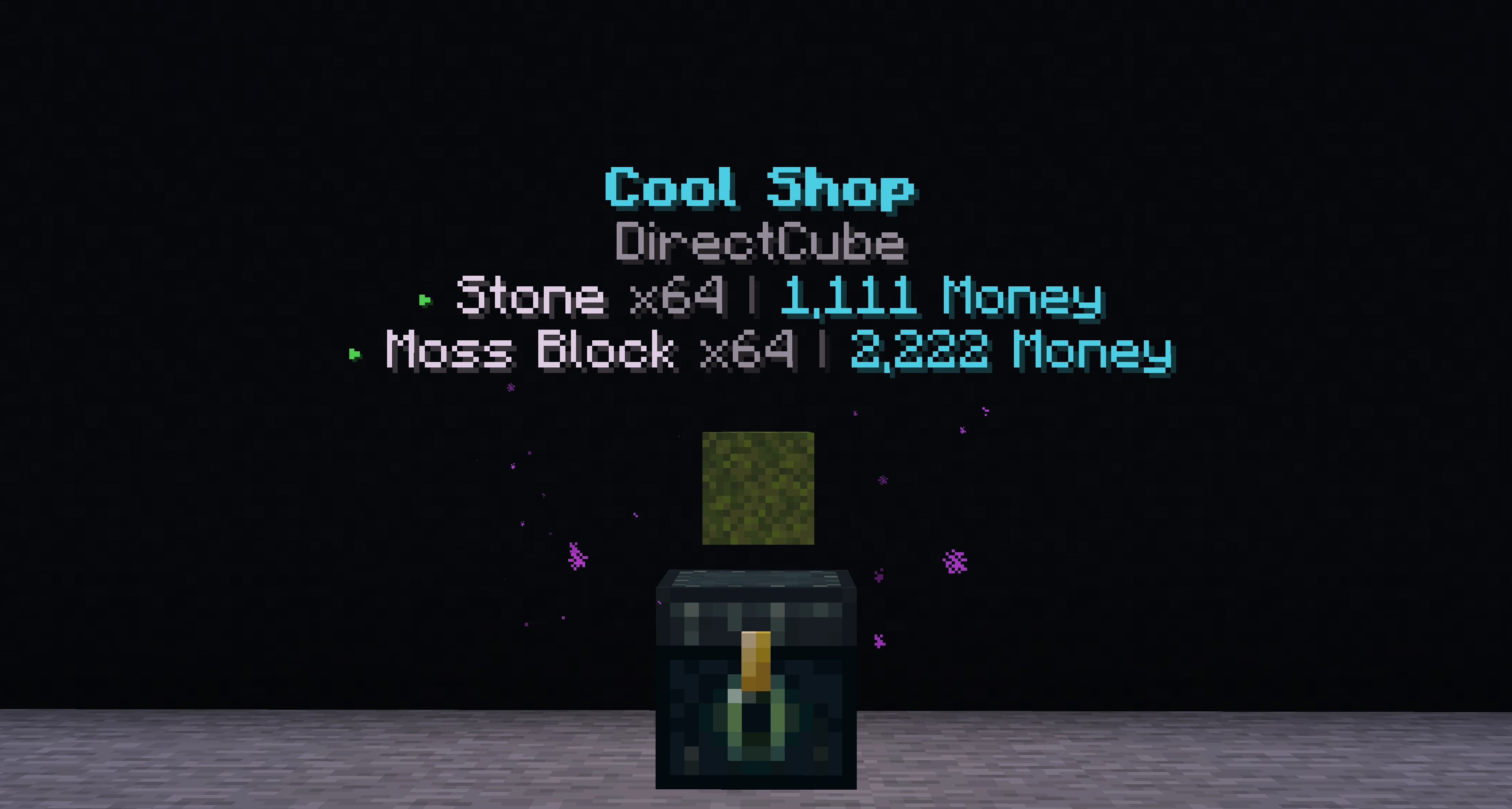
A shop advertises itself. Just above the block, a turning item cycles through whatever the shop has on offer, and above that floats its name, its owner, and a line for every slot it is trading: what the item is, the price, and how many are left if it is selling. You can read a stall from across the island without opening anything.
You can rename your shop, and the name is part of that sign.
Nothing you set is locked in. Prices, currencies and items can all change at any time, though a slot has to be emptied before it can be pointed at a different item.
Clear Slot is how you empty one, and it is a single click: the slot is wiped and everything still inside it (stock on the shelf, anything sold to you and not picked up) comes back to you in the same moment. You never have to take things out by hand first. Anything that will not fit drops at your feet.
#Getting paid
Sales pay straight into your balance when you are online on the same oasis as the buyer. When you are not, the money waits in your collection box instead.
/pshop lists your shops and shows what is waiting. /pshop collect hands it all over: money from sales, and any items that came back to you from a shop you broke.
Nothing is ever lost to being offline. It just waits.
#Currencies
Player shops price in money, gems, pearls, Farm Tokens or doubloons. Each slot picks its own, so one shop can sell blocks for money and rare drops for gems.
The server takes no cut. What the buyer pays is what the seller gets.
#Breaking a shop
Only the owner can break their own shop block. Doing it returns everything at once: the block, the stock still on the shelves, and anything a buying slot collected for you. A buying slot nobody sold into has nothing to return, because it never cost you anything.
If you are not standing there when it happens, it all goes to your collection box.
#Staying safe
- Read the item itself before you buy. Enchant levels, quality tiers and remaining uses are all written on it.
- The confirm screen always shows the total. If the number surprises you, back out.
- Selling into a buying slot is safe: your items only leave you if the payment goes through in the same moment.
#Next
- Auction house The other way to sell without both of you being online.
- Direct trade A negotiated swap, face to face.
- Server shop Where the shop block is stocked.
- Gang islands Where player shops are allowed to stand.