Server shop
Buy building materials and other stocked items for money, from any oasis.
/shop is the counter the server itself sells from. It stocks building materials and whatever else staff have listed, it takes money, and it is the same list at the same prices on every oasis.
It only sells. Nothing you own can be sold back here, so the shop is never a way to turn items into money. For that, use the auction house, a direct trade, or the sell command that belongs to your grind.
#What it stocks
Categories cover what builds are made of:
- Stone and Earth and Bricks and Tiles for the structural blocks, plain and polished.
- Wood for every species: logs, planks and stripped logs.
- Wool and Carpet, Concrete, Terracotta and Glass in the full colour range, plain and glazed and stained.
- Nature and Garden for leaves, saplings, flowers, moss and the rest of the greenery.
- Utility and Redstone for the working blocks: chests, hoppers, pistons, rails, observers.
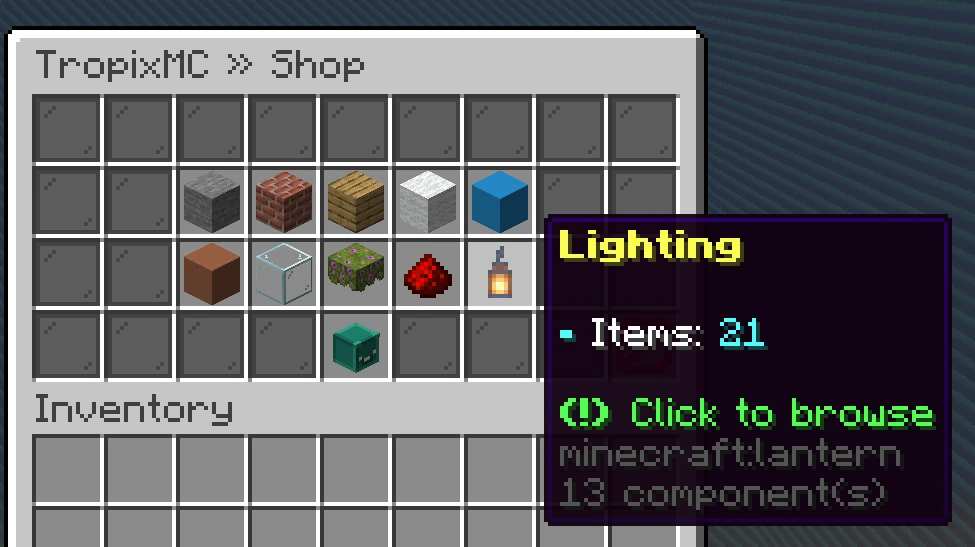
- Lighting for torches, lanterns, glowstone, froglights and the rest.
- Ores and Ingots for the crafting materials: coal, copper, iron, gold, redstone, lapis, quartz, amethyst, emerald, diamond and netherite, as loose units and as full blocks.
- Decor for finishing a build: tulips and the rarer flowers, grass, ferns, mushrooms, cobwebs, berries, coral, decorated pots and pottery sherds, dyed candles, banners, shelves, copper golem statues and mob heads.
That is the list the server starts with. Staff add to it, so what you see in game is always the real answer.
Ores here are crafting stock. Your gang mine pays you money for what you break rather than handing you the block, so this page is where the raw material for tools, armour and enchanting comes from. A block costs exactly nine of its loose form, so it never matters which one you buy. Ancient debris and netherite scrap are not sold, so netherite comes as the finished ingot.
#Buying something
/shopopens the categories. Each one says how many items are on it.- Click a category to see what it stocks. Every item shows its price for one.
- Click an item to open the amount screen.
- Set the amount with the plus and minus buttons, or hit Max to jump to the largest order you can both afford and carry.
- Buy takes the money and hands the items over.
The Buy button tells you the total and what your balance will be afterwards, before you click it. If you cannot afford the order it says so instead, and takes nothing.
Anything that will not fit in your inventory drops at your feet, so clear some space before a big order.
#Buying the same thing again
/rebuy repeats your last shop order: same item, same amount, no menus. It is meant for the run of the build where you keep going back for another stack of the same block.
It is a rank perk, so it is unlocked by a rank rather than free to everyone. The shop itself is free either way, and /rebuy never buys anything you could not have bought through the menu.
The shop remembers one order at a time, and every purchase replaces it. The order follows you between oases, so you can buy on one and /rebuy on another.
If the price has gone up since that order, /rebuy does not quietly charge the difference. It opens the amount screen at the new price and lets you decide. If the item has been delisted, or you have not bought anything yet, it says so and takes nothing.
#Rank discounts
Some ranks pay less at the shop. If yours does, your head on the shop menu says so and every price you see is already the reduced one, with the normal price underneath it for comparison. The discount applies to everything in the shop, and the best one you hold is the one you get.
#Things worth knowing
- The catalogue is live. Staff can add, re-price or remove an item at any time, and it changes on every oasis at once, including while your menu is open.
- If an item disappears between opening the menu and clicking Buy, the purchase is refused and nothing is charged.
- Items bought here are ordinary items. They can be traded, auctioned, stored in a vault and lost on death like anything else.
#Next
- Auction house Sell to other players, at your price.
- Store Doubloons and what they buy.
- Backpack Where mined blocks turn into money.