Quality of life
Warps, trains, the sidebar, resource pack toggles and rank perks.
The convenience layer. None of it changes the grind; all of it makes the server less annoying to move around.
#Warps
/warp(/warps,/fasttravel)- Open the warp list, or warp by name.
/spawn- Back to spawn.
/mall- The mall.
Spawn and the mall are free to everyone. Other warps may be restricted, and the list shows what you can reach. Warps work from any server: if the destination lives elsewhere, you are routed there automatically.
#The mall map
/mallmap(/stores,/malldirectory)- The directory of the mall, as the A-Z list unless you last used the floor plan.
/mallmap list//mallmap map- Open it as an A-Z list, or as the floor plan.
/mallmap <store>- Go straight to one shop.
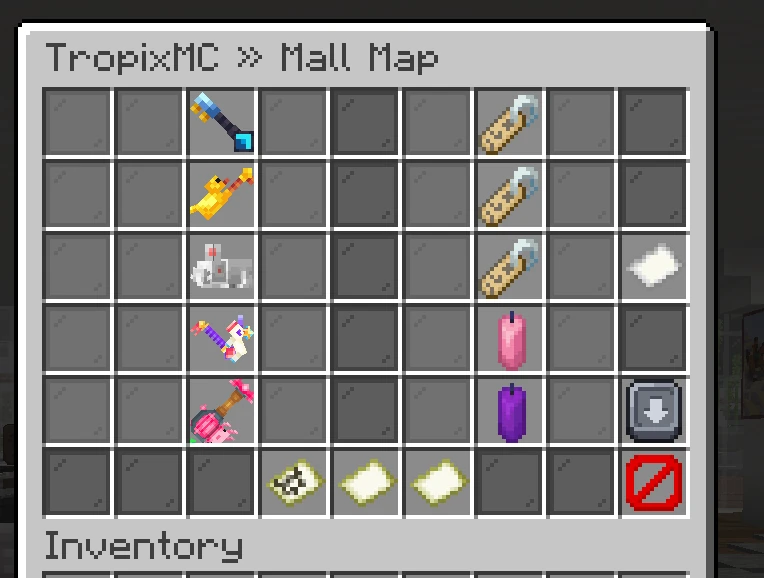
The mall is a building with several floors, and the map is its directory. Each shop sits on its own square of the floor plan, laid out the way the building is, so the screen matches the walk. Click a square and you are taken to that shop front. The tabs along the bottom switch floors, and the arrows down the right-hand edge scroll the floor when it is taller than the screen.
Some entries are shops with a door you stand in front of; a few are screens rather than places, and clicking those opens the menu directly. Either way it is one click from anywhere, and it works from any server.
The rest of the map is scenery: walls and corridors so the floor reads like the building, and named squares marking a wing or an entrance. Those are there to be read, not clicked.
A plain /mallmap opens the list: the same shops sorted A to Z, every floor at once, a page at a time, with the floor written under each name. Use it when you know the shop and not where it is. The button in the bottom-left corner swaps it for the floor plan and back; the button sits in the same place on both screens, and whichever one you were last on is the one a plain /mallmap opens next time.
#Where you respawn
Wherever you die, you come back at spawn. Beds and respawn anchors do not change that, so dying in a gang mine or on an island drops you at spawn instead of somewhere you then have to walk out of. If spawn lives on another server you are routed there straight after respawning. /back returns you to where you died.
#Hunger
Your food bar does not go down. There is nothing to eat here, so there is nothing to manage: no starving in a mine, no packing bread before a session. /feed still tops your health back up.
#Trains
Some destinations are reached by train. Board at a station, pick a seat from the menu, and the ride glides you along its route rather than teleporting. It is slower than a warp on purpose; it is scenery.
Commands are locked while the train is moving, and so is your inventory. Both open again the moment you step onto the platform.
#Your sidebar
/scoreboard(/sb)- Toggle your sidebar on or off.
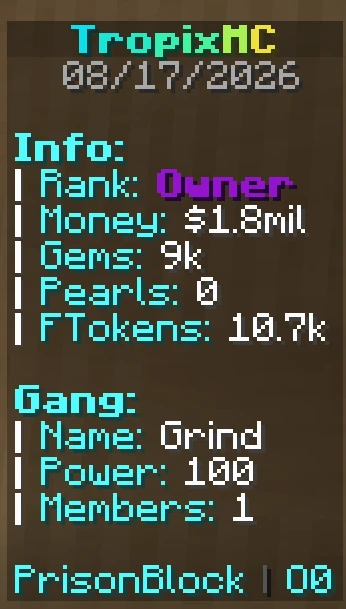
The sidebar shows your balances, your gang, your rank and which server you are on. The choice is remembered and follows you across servers.
The last line of the sidebar also says which chat you are typing in: Global, or Gang while gang chat is toggled on with /gang chat. Turn that part off under Sidebar Chat in /settings.
#Resource packs
/packs opens the addon pack menu, where you can toggle optional resource pack additions on and off for yourself.
#Flight, speed, night vision
/fly, /speed <1-10|reset> and /nv exist and are rank or staff gated. Where you have them, they persist across relogs and across servers, so you do not have to re-enable them every hop.
/speed is context aware: it sets your flight speed if you are flying, and your walk speed if you are not.
#Flight Notes
A Flight Note is a glinting feather that lends you /fly for the length printed on it. Right-click one to redeem it, or sneak and right-click to redeem the whole stack. Flight switches on as soon as you redeem; double-jump to take off, and use /fly to toggle it like a rank holder would.
- Time
- Runs on the real clock, so it keeps counting while you are offline.
- Stacking
- Redeeming more while time is left adds to it.
- Time left
/fly time, or the readout on your action bar while you fly.- Running out
- You get warned as the end gets close. If you are in the air when it ends, you take no fall damage on the way down.
- With a rank
- A rank that already has
/flycannot redeem notes. Keep them to trade or sell.
Flight Notes come from rewards and from storefronts that sell them. They trade like any other item. Turn the action bar readout off under Flight Timer and the warnings under Flight Warnings in /settings.
#Rank perks
A set of small commands that come with ranks. You keep them across relogs and across servers; if a rank lapses, so do its perks.
#Getting around
/back(/return)- Go back to where you were before your last death or teleport.
/asc(/ascend) //desc(/descend)- Step to the next floor up or down.
/near [radius](/nearby)- Who is standing near you, and how far away.
/seen <player>(/lastseen)- When someone was last online.
/back remembers which server the spot was on, so if you died on another oasis it routes you there first. Running it twice returns you to where you started. /near only looks at your own world on your own server; /seen looks across the whole network.
/asc and /desc do not work in a gang mine or at a fishing pond. Both go straight through ceilings, which there would put you on top of the build.
#Handy windows
/wb(/workbench,/craft)- A crafting table, anywhere.
/cartographytable(/cartography,/ctable)- A cartography table, anywhere.
/disposal(/trash,/dispose,/bin)- A bin.
/hat- Wear what you are holding.
/skull [player](/head)- A player head wearing that player's skin.
/feed(/eat)- Refill hunger and health.
Anything left in the disposal window is destroyed when it closes, including on a disconnect. Soulbound items are refused entry, so you cannot bin one by accident. Regions that block workbenches block /wb and /cartographytable too.
/skull takes any Minecraft name, whether or not that player has ever joined here. Run it bare for your own head. The head is an ordinary player head, so you can wear it, place it or trade it.
#Making things yours
/rename renames the item in your hand. It works on tools, weapons, armour, name tags and shulker boxes. Colours come with the perk; bold is sold separately. Other formatting is not allowed, because an unreadable item name is how people get scammed. Run /rename with nothing after it to strip a name back to normal.
/ptime and /pweather pin the sky and the weather you see. Nobody else's view changes, and the world itself is untouched. Both follow you between servers.
/hideplayers hides everyone else so you can look at a build or stand at spawn without the crowd. Run it bare to toggle, or /hideplayers off to bring people back. Anyone who logs in while it is on stays hidden too, players visiting from another oasis are hidden along with the ones on your own server, and the setting follows you between servers.
/scaledown, /scalenormal, /scaleup and /scalemega change how big you are. Each size is its own perk. Being bigger means a bigger hitbox and a longer reach; being smaller means the opposite. /scalenormal always works, so you can never get stuck at a size.
#Fastplace
/fastplace is a small build tool. Get the wand with /fastplace wand, left-click a block for one corner, right-click for the other, then:
/fastplace fill [block]- Fill the whole box.
/fastplace walls [block]- The four vertical sides.
/fastplace outline [block]- All six faces.
/fastplace replace <from> <to>- Swap one block type for another inside the box.
/fastplace remove [block]- Clear the box, or just one block type, into your inventory.
/fastplace copy- Remember the blocks in the box.
/fastplace paste- Build the copy again, wherever you are standing.
/fastplace info//fastplace clear- Show your selection and clipboard, or drop the selection.
Leave the block name off a fill, walls or outline and it uses whatever you are holding. Two things make it fair rather than free building:
- It spends your blocks. Every block placed comes out of your inventory, and the whole job is refused up front if you do not have enough. Custom-named stacks are never spent.
- Protection still applies. Each block is placed as if you had placed it by hand, so anywhere you cannot build, it will not build either. It reports how many placements were refused. Copying is checked the same way, before anything reaches your clipboard.
There is a size limit on a selection, and by default it only builds into empty space rather than over existing blocks. A job you cannot afford is refused whole, so you never get half a build. /fastplace info shows your own limit, and the top rank lifts it far enough that ordinary builds never hit it. Everything else stays the same at that size: the same blocked worlds, the same protection checks, and every block still paid for out of your inventory.
Removing is the other direction. /fastplace remove clears everything in the box and puts the blocks back in your inventory, one item per block, and /fastplace remove <block> clears only that one type and leaves the rest of the box alone. Name a seed and it clears the crop that seed plants. It is checked exactly like building is, so it only clears where you could have built, and it stops the moment your inventory is full rather than destroying anything it cannot hand you. A few things are left standing on purpose: any container with something in it, so a chest is never emptied into nothing, and the custom blocks and farm crops from the resource pack, which have to be broken by hand. Blocks with no item of their own, like water or farmland, are cleared without giving you anything, and the blocks the tool will never place are the blocks it will never remove either.
Copy and paste follow the same rules. You can only copy where you could build. Standing next to something is not enough: if any block in the selection sits somewhere you have no build rights, the copy is refused whole and you are told which block stopped it. Spawn, the mall, the mine and other gangs' islands are all off limits that way, and so is an island you are only visiting unless its owner gave you building rights. A paste costs you the blocks it contains, every one of them, so it saves you the placing and nothing else. It remembers where you were standing when you copied and rebuilds at that same offset from wherever you stand next, and it works across worlds. Block shapes are kept, so a staircase pastes as a staircase, but chests and other containers paste empty. Doors, beds and other two-block things do not survive the trip. Your clipboard lasts until you log out.
Seeds plant instead of building. Name a seed, or just hold one, and the box is sown rather than filled: wheat, beetroot, carrots, potatoes, melon, pumpkin, torchflower, pitcher pods, nether wart and sweet berries all work. It costs you the seeds the same way a wall costs you blocks, and it only plants where there is something to plant in, so select the layer just above a tilled plot and the tilled squares get sown while everything else is left alone. Crops planted this way grow on the normal timer and answer to the same island unlocks as a seed you pushed in by hand, so it saves you the clicking and nothing else. Copying a grown field and pasting it gives you seedlings, not a harvest.
The farming grind's own crops sow the same way. Hold the seed bag, or name it by the id on the bag, and the box is planted with that crop. It costs the bags out of your inventory, it needs farmland and light like any planting does, and on an island it obeys your gang's build rights and its crop ladder, so you can only sow what your gang has opened. If the whole box is refused you are told which of those to fix. Copy and paste handle them too, and a copied field pastes as fresh seedlings.
Auto-buy tops up a short build. With the auto-buy rank perk and its switch on in Settings, a build you are short for buys the rest instead of being refused, so a paste no longer means a trip through /shop first. Blocks come from /shop at the price the menu would charge you, rank discount included, and when two pages list the same block you pay the cheaper one. Seeds come out of your seed bag first. Carrots and potatoes are their own seed, so the plain ones in your farming backpack go next. After that they come from /seedshop in Farm Tokens, and only for crops your gang has opened. Nothing lands in your inventory: the build uses your own blocks first and the bought ones after, paying for them as it places them, and whatever it did not use comes back when it ends, the money at the price you paid, the seeds to your bag and the crops to your backpack. If your balance runs out partway, the build stops there. Set it to ask first and you get the price in chat with a line to click, and hovering the line lists every block and where it comes from. Set it to buy and build and it starts straight away, then tells you what it costs. If the build needs something no shop sells, the whole job is refused and you are told which block, the same as being short.
#What is waiting when you join
Log in and one panel appears in chat with everything that is sitting unopened: missions ready to claim, today's daily square if you have not taken it, crate claims off cooldown, and voting sites you have not used today. A row only appears when there is something behind it, so the panel is short on a quiet day and absent when there is nothing at all. Click any row to open that feature.
It shows when you join the network, not when you move between servers, so warping around does not hand you the same list over and over.
Every row keeps its own switch in Settings, and the panel itself has one, so you can drop a single row, drop the chime, or turn the whole thing off.
#Chat conveniences
Covered fully on Chat, but worth knowing here:
[item]posts what you are holding.[inv]posts a read-only snapshot of your inventory.[ping]posts your connection delay, coloured by how healthy it is.- Clicking a name in chat starts a message to them.
#Next
- Settings One menu for every toggle on this page.
- Homes Named teleport points you set yourself.
- Player vaults Personal cross-server storage.
- The network Why moving between servers takes a moment.
- Daily login A shuffled reward calendar, one square a day.
- Voting Vote on the listing sites for keys, Doubloons and streak rewards.
- Referrals Invite new players and earn Doubloons as they play.
- Reporting players Send a rule breaker to staff with /report.