Direct trade
A two-sided window with anti-scam confirmation, working across servers.
/trade <player> opens a negotiated swap. It works whether you are on the same server or not.
#The flow
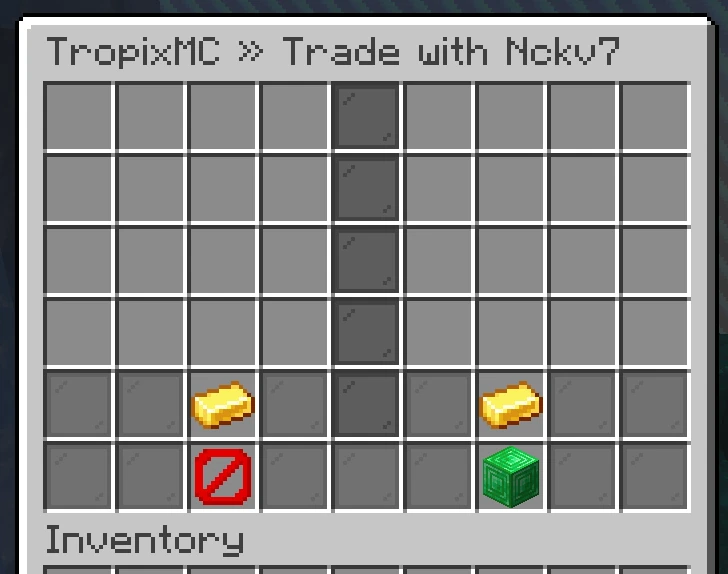
/trade <player>sends a request. They get clickable Accept and Deny buttons.Accepting opens a shared trade window with your side and theirs.
Each side adds items into their slots, and can add money, gems, pearls, doubloons or Farm Tokens through their currency button.
Both sides press Confirm. Only then does anything move.
Afterwards you each get a summary of exactly what you gave and received.
#Adding part of a stack
Click a stack in your inventory to put it on the table. Left-click adds the whole stack, right-click adds half, and shift-right-click adds one. The same clicks on your side of the window take items back. Adding more of an item already on the table tops up that slot instead of using a new one.
On Bedrock every tap adds or takes back the whole stack, so split a stack in your inventory first if you only want to give part of it.
#The anti-scam rule
That means the only real way to be cheated is to misread what is in front of you. Check the item text: enchant levels, quality tiers, remaining uses and durability are all written on the item.
#Currency amounts
Every balance you hold can go into a trade. Click your currency button to open a menu with one icon per currency, each showing what you have offered next to what you still hold. Set as many as you like without leaving the menu, then press Back.
Both currency buttons in the trade window list everything that side has put in, so you can read the whole deal without opening anything. Amounts are only ever hidden from you while a menu is open, never at the moment you confirm.
The amount prompt takes shorthand like 100k or 1.5m. If you type something it cannot read, it tells you and lets you try again rather than cancelling the trade.
Ask for more than you hold and the offer is set to your balance instead of failing, so you never confirm a trade you cannot pay for.
#Cross-server trading
Trading works between players on different servers in the network. Items never exist in two places at once during the swap: they leave your inventory into the trade, and are handed to the other side only on completion, or returned to you if the trade is aborted, closed, or you disconnect.
#When to use trade instead of the auction house
- The other person is online and you are already talking.
- You want a swap, not a sale.
- You are moving something the auction house does not allow.
- You do not want to pay a listing fee or wait.
#Next
- Auction house Selling to the whole network instead.
- Chat Finding people to deal with.