Chat
One global chat across the whole network, plus cosmetics, ignoring and filters.
Chat is global across the entire network. Everyone sees everyone, whichever server they are on, so there is one conversation rather than several lonely ones.
#Talking to specific people
/msg <player> <message>- Direct message, network-wide.
/gang chat(/gang c)- Talk to your gang only.
- Click a name in chat
- Pre-fills a direct message to them.
#The player card
Hover any name or message in chat and a card opens on the player who sent it. It is built the moment they speak, so everyone on every server reads the same card, and it says who they really are: their account name even behind a nickname, their rank, the server they are on, how long they have played and how long they have been on the network.
Below that it carries up to three sections, and each one appears only when there is something in it:
| Section | What it shows |
|---|---|
| Gang | The gang, its level, its member count and its score. |
| Grind | Fish caught, blocks mined and crops harvested, for life. |
| Wealth | Money, gems, pearls, farm tokens and doubloons. |
A new player's card is short, because a total of nothing is left off rather than printed as a zero.
Playtime and the join date are network figures, not per-server ones, so they read the same whichever oasis you meet someone on.
All three sections have a switch in /settings chat. They are the one part of that menu that changes what other people see rather than what you see: the card is stamped on your message as you send it, so if you would rather not advertise your balances, turn Show Your Balances off and nobody's card of you carries them.
#Cosmetics
Your chat line is yours to decorate:
| Command | What it sets |
|---|---|
/chatcolor |
The colour of your messages. |
/gradient |
A gradient across your message. |
/prismatic |
An animated multi-colour style. |
/tag |
A cosmetic tag before your name. |
/emoji |
Emoji you can type as :name: anywhere you chat. |
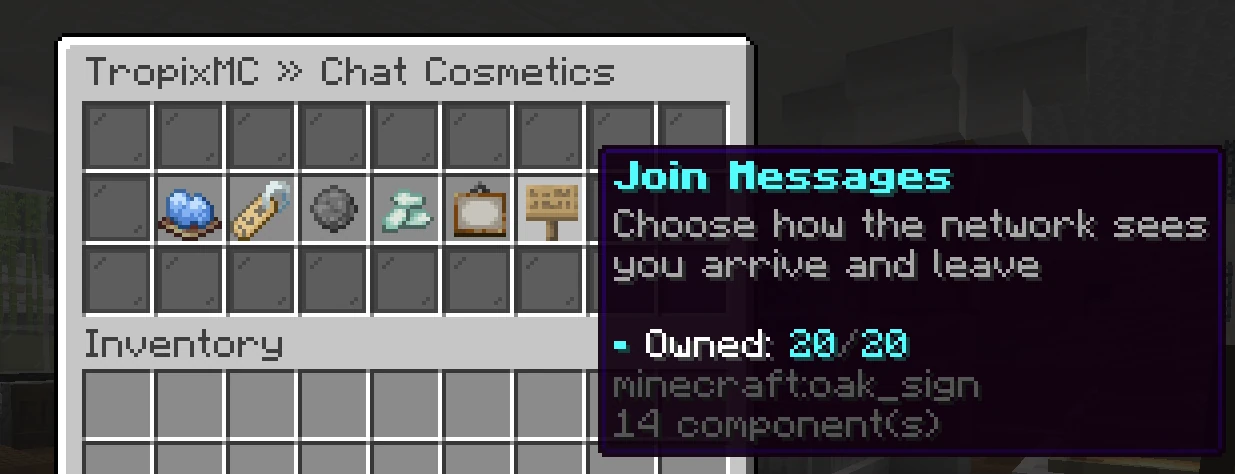
/joinmsg |
The line shown when you join and leave. |
/nick <name|off> |
A chat nickname. Rank perk. |
Emoji work in every channel you can type in: global chat, /gang chat and direct messages. A handful of emoji are free to everyone from the start. Every other cosmetic is unlocked individually, chat colours included, through vouchers, crates, the store or ranks. Each menu shows what you own and what is still locked, and a cosmetic you claimed from a voucher shows the edition it was. Until you own a colour your messages read plain grey, and a colour you own but later lose goes back to grey without forgetting your choice, so regaining it puts it straight back on.
A few tags are earned by playing rather than bought. Completing a TackleDex set mints Master Baiter, Master Lurer or Tacklemaster straight into your /tag menu, and filling a pond in the FishDex mints that pond's Angler tag, with FishDex Master for all of them.
Prismatics are the one cosmetic your own computer draws rather than the server: the colour is repainted on every letter, every frame. If a long prismatic message costs you frames, Animated Colours in /settings chat shows them to you as a plain colour instead, and everyone else still sees them move.
Every donor rank carries a gradient of its own, named after the rank and coloured to match it. Reaching the rank puts it in your /gradient menu; the ladder is built so each one runs into the colour of the rank below it.
Each rank also carries a pair of solid chat colours, drawn from the shades of that rank's own name tag, so the colour you type in matches the tag in front of it. They arrive in your /chatcolor menu when you reach the rank. They are shades of their own, separate from the colours vouchers and crates hand out.
Each rank carries a chat tag of its own as well, the rank's name written in the same colours. It lands in your /tag menu when you reach the rank, and the ranks below you keep theirs there too, so you can wear any rank you have passed.
Redeeming a voucher is a right-click: it grants the cosmetic permanently to your account.
#Nicknames
/nick <name> renames the name on your chat line. It is a rank perk, so it arrives with the rank rather than being there from the start, and /nick off puts your real name back. Tab, your nametag and the player list are untouched, so people can always still find you.
Colours and hex come with the command. Bold is a further rank perk of its own. Obfuscated, strikethrough, underline and italic are refused from everybody, whatever the rank: a name nobody can read is how trade scams start, and chat is where people read yours.
#Join and leave messages
/joinmsg (also /leavemsg) picks the line the whole network reads when you arrive and when you go. One pick covers both, so your arrival and your departure always match, and the menu previews each pair with your own rank and name before you equip it.
The line is network-wide, not per-server, so moving between servers is silent: you only announce when you join the network and when you leave it. The Remove button puts you back on the standard line.
#Rank welcomes
The top ranks are announced twice. Their join message plays as normal, and a welcome line follows it on the line underneath, so the arrival reads as two lines rather than one. It rides on top of whatever you have equipped in /joinmsg, so picking a join message never costs you the welcome, and having no join message equipped never costs you it either. There is nothing to equip and no menu: the rank is the whole of it.
The welcome is painted in its rank's own colours, the same ones the name tag in front of it uses, so you can tell which rank arrived without reading the tag. Ranks on both ladders carry one. Holding a rank from each does not give you two lines: you get the single highest one.
Welcomes have their own /settings switch, separate from the join and leave one, so you can keep ordinary join lines and mute these, or the other way round.
#Server tips
Every fifteen minutes the server posts a tip in chat, and the rotation runs network-wide: the same tip reaches every server at the same moment, then the next one comes round. They point at the things that are easy to miss, mostly a command worth knowing about.
Some tips are clickable. Point at one and it says what the click does: run the command it names, type it into your chat box ready to edit, or open a link. A tip with nothing to click is plain text.
Tips pause when nobody is online, so the rotation carries on where it left off rather than talking to an empty server.
Server Tips in /settings chat switches them off. It is separate from the public chat switch, so muting the crowd does not mute the server, and muting the server does not mute the crowd.
#Filtering and ignoring
/togglefilterswitches your own soft filter on or off. With it on, filtered words are masked for you only; other people's settings are their business. Changing it needs a linked Discord account, so run/discord linkfirst if you have not. It is also in/settings chat, which shows the same lock./ignore <player>hides someone's messages from your chat entirely, and/unignore <player>undoes it. Ignoring is a real hide, not a placeholder.- Public chat has an on/off switch of its own in
/settings chat. Off hides everything players say in global chat, on every server. Direct messages, gang chat and staff replies are separate switches, so turning public chat off never stops somebody reaching you.
Some language is blocked outright for everyone, and blocked messages are not delivered at all.
Unusual symbols are refused too. Ordinary letters, numbers, punctuation and accents all send fine; a wall of decorative glyphs does not, and the message is refused rather than sent. This covers direct messages as well as global chat, so /msg and /r follow the same rule.
#Item, inventory and ping tokens
Typing [item] in chat shows the item you are holding, hoverable by everyone. Typing [inv] posts a button that opens a read-only snapshot of your inventory. Both are the honest way to show off or to prove what you are selling.
Typing [ping] posts your connection delay to the server, coloured green, yellow or red by how healthy it is. It is measured the moment you send, so it settles the argument about who is lagging.
#Discord boosters
If you boost the Discord, /booster (alias /nitro) opens your perks and lets you set a coloured Nitro tag on your chat line. Your weekly nitro key is claimed with /claim. Both re-check your boost every time you use them, so perks appear and disappear with the boost itself.
#Next
- Voice chat Talk out loud to the players near you, with the Simple Voice Chat mod.
- Chat games Unscramble, typing, maths and trivia rounds for a crate key.
- Settings Public chat, the filter, direct messages and your ignore list in one menu.
- Discord Linking your account and the bridge.
- Direct trade The safe way to act on a chat deal.