Visitors
Private, allowlist or public. Plus the browser, the visitor cap, and moderation.
An island has a privacy setting, and it decides who can walk onto it. Open the visitor settings from the island hub; changing them needs Manage Island.
#The three privacy modes
- Private
- Only your own gang. The default.
- Allowlist
- Your gang, plus the players and gangs you trust.
- Public
- Anyone on the network can visit.
#Visiting
/island visit <gang|player>takes you to that island, routing you across the network if it lives on another server./island browse(or/island list) opens a browser of islands currently open to visitors, so you can go and look at what people have built. Sort it by popularity, name, level, score, members, size or age; on a ranked sort the top three stand on a podium. Each card shows the gang's level, style and size, with who is visiting now (Popular) or its gang score, and clicking a card takes you there. Popular puts the islands with visitors right now first; after those, islands rank by how many different players have visited them this season, and a card with nobody on it shows that number./island leavesends you home.
Arriving any other way counts as a visit too. If a friend accepts your teleport request while they are standing on their island, you land there as their visitor, and the visitor settings, the capacity limit and the host's kick all apply exactly as they would have. A ban still keeps you out.
If you log out while visiting, you are put back on that island when you return, not dumped at spawn.
#Where they arrive
Visitors land at the island's visitor entry, which anyone with Manage Island sets with /island setspawn visitor or the Spawn Points tile in the island menu. Until you set one, guests arrive wherever your own gang lands. See Islands.
#What visitors can do
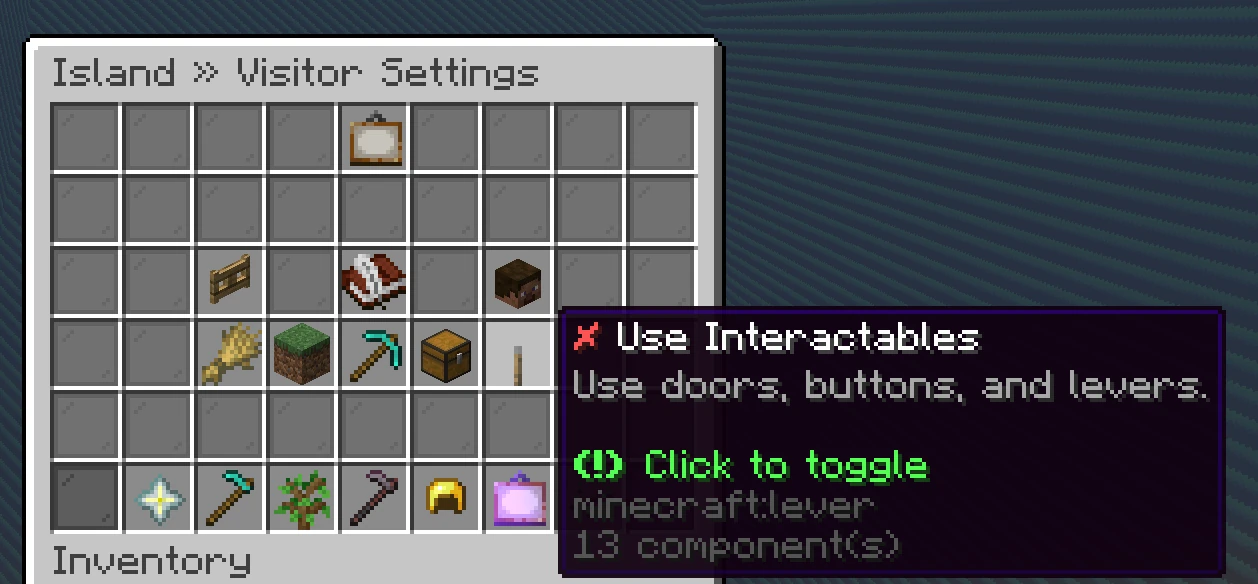
Visitor abilities are set separately from gang ranks, and they are off by default. In the visitor settings you can grant the public default set, and give individual allowlist entries their own set:
- Harvest crops
- Place blocks
- Break blocks
- Open containers
- Use interactables
- Use fertilizers
- Join voice
Harvest crops lets a guest clear the ripe crop they right-click, one at a time. They get no drops, no Farm Tokens and no progress, and their hoe's area enchants and skin abilities reap nothing on your island. Growing crops stay put.
Use fertilizers lets a guest activate one of their own fertilizers on your island. The buff is island-wide and lands on your crops, and a visitor harvest still earns them nothing, so it is a gift from them to you rather than a way to farm your island. Handy for a partner gang helping you through a grow.
Join voice lets a guest into the island's voice chat channel, so you can talk while you show them round. Like the rest it is off until you grant it, and it does not let them hear anything when they are not on your island.
Place and Break cover more than blocks. Hanging a painting, setting down a boat or an armour stand, and lighting a fire all count as placing; punching a painting or an item frame off a wall, popping a boat, and killing the animals count as breaking. Use interactables covers the small edits too, like emptying a flower pot or writing on a sign.
Open containers also covers items on the ground. A guest without it cannot drop an item on your island or pick one up, so nobody can feed junk into your hoppers or walk off with what your farm drops. If a guest closes a full inventory while holding an item, that item falls at their feet instead of being lost. Only they can pick it up, and your hoppers leave it alone.
Ender pearls and chorus fruit never work for a guest, whatever you grant, so a wall around a farm keeps visitors out of it.
#The allowlist
The allowlist takes players or gangs by name. Each entry gets its own permission set, so a partner gang can farm with you while a single trusted friend gets full build rights.
#Capacity
You can set a maximum visitor count. Once it is reached, further visitors are told the island is full and can try again later. Useful when you are running an event and do not want forty people in one greenhouse. The Visitors tab of /island shows how many are on your island right now next to the limit.
#Moderation
Anyone with Manage Island can:
/island kick <player>- Remove a visitor who is on your island right now.
/island ban <player>- Remove them and stop them coming back.
/island unban <player>- Undo a ban.
Bans persist, and a banned player is told they are banned rather than being silently blocked.
#Next
- Island permissions The gang-side half of access control.
- The network Why visiting sometimes moves you between servers.